Open as Jupyter notebook in
Google Colab.
In Google Colab, run
pip install pairinteraction before the first notebook cell to install PairInteraction.
Dispersion Coefficients Near Surfaces
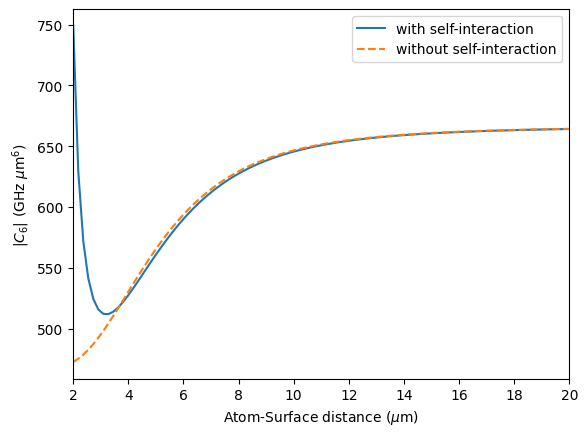
This jupyter notebook demonstrates how to compute the C6 coefficient near a surface using the pairinteraction library. It is comparable to the examples provided in the old pairinteraction software, which can be found here and reproduces the results from Phys. Rev. A 96, 062509 (2017). However, in this notebook, we show
the effect of also including the self interaction of the atom with the surface.
[1]:
import matplotlib.pyplot as plt
import numpy as np
import pairinteraction as pi
from pairinteraction.green_tensor import GreenTensorSurface

if pi.Database.get_global_database() is None:
    pi.Database.initialize_global_database(download_missing=True)
[2]:
def calc_c6_list(
    ket1: pi.KetAtom,
    ket2: pi.KetAtom,
    distance_surface_list: np.ndarray,
    distance_atoms: float,
    include_self_interaction: bool = True,
) -> np.ndarray:
    c6_list = []
    for z in distance_surface_list:
        basis_atom = pi.BasisAtom.from_kets([ket1, ket2], delta_nu=4, delta_l=2)
        system_atom = pi.SystemAtom(basis_atom)
        system_atom.set_magnetic_field([0, 0, 1], unit="gauss")
        if include_self_interaction:
            gt_self = GreenTensorSurface(
                [0, 0, 0],
                [0, 0, 0],
                point_on_plane=[-z, 0, 0],
                surface_normal=[1, 0, 0],
                unit="micrometer",
                without_vacuum_contribution=True,
            )
            system_atom.set_green_tensor(gt_self)
        pi.diagonalize([system_atom])

        basis_pair = pi.BasisPair.from_kets(
            [(ket1, ket2)],
            system_atoms=(system_atom, system_atom),
            delta_energy=5,
            delta_energy_unit="GHz",
        )
        system_pair = pi.SystemPair(basis_pair)
        gt = GreenTensorSurface(
            [0, 0, 0],
            [0, 0, distance_atoms],
            point_on_plane=[-z, 0, 0],
            surface_normal=[1, 0, 0],
            unit="micrometer",
        )
        system_pair.set_green_tensor(gt)

        eff_system = pi.EffectiveSystemPair([(ket1, ket2), (ket2, ket1)])
        eff_system.system_pair = system_pair

        eff_h = eff_system.get_effective_hamiltonian(return_order=2, unit="GHz")
        c6 = -eff_h[0, 0] * (distance_atoms**6)  # GHz um^6
        c6_list.append(c6)
    return np.array(c6_list)
[3]:
ket1 = pi.KetAtom("Rb", n=69, l=0, j=0.5, m=0.5)
ket2 = pi.KetAtom("Rb", n=72, l=0, j=0.5, m=0.5)

atom_atom_distance = 10.0  # micrometer
atom_surface_distances = np.linspace(2, 20, 100)

c6_dict: dict[str, np.ndarray] = {}
c6_dict["with self-interaction"] = calc_c6_list(
    ket1, ket2, atom_surface_distances, atom_atom_distance, include_self_interaction=True
)
c6_dict["without self-interaction"] = calc_c6_list(
    ket1, ket2, atom_surface_distances, atom_atom_distance, include_self_interaction=False
)
[4]:
fig, ax = plt.subplots()

ls = ["-", "--"]
for key, c6_list in c6_dict.items():
    ax.plot(atom_surface_distances, np.abs(c6_list), label=key, ls=ls.pop(0))

ax.set_xlabel(r"Atom-Surface distance ($\mu$m)")
ax.set_ylabel(r"$|C_6|$ (GHz $\mu$m$^6$)")

ax.set_xlim(2, 20)
ax.legend()

plt.show()